Pipeline mocap / Tech-art

Virtual Production

Pipeline de personnage et de mocap, avec retargeting Houdini en temps réel

HoudiniUnreal EngineLive LinkMocapARKitOptiTrackBlenderPipeline

L'idée

Virtual Production couvre la modélisation, les blendshapes, le rig, la physique des vêtements, le retargeting et la visualisation d’un personnage animé par mocap, faciale et corporelle. Les données passent d’un logiciel à l’autre par FBX, puis par Live Link.

Je l’ai monté en 2026 comme socle pour ma recherche personnelle. C’est donc une base de travail, pas un outil fini. Deux choses restent à faire :

  • une scène cliente Unreal prête à recevoir les données, et un script Houdini qui y envoie la scène automatiquement, pour ne plus refaire le même setup à chaque projet
  • une fois la previs actée (caméras animées, mocap enregistré), un envoi automatique vers un DCC plus classique pour le rendu et le lighting finaux. Si le projet est en temps réel, on s’arrête à Unreal

Le flux

La préparation amont (modélisation, traitement du scan facial, création des 52 blendshapes au standard ARKit) se fait dans n’importe quel DCC, tant que l’export FBX porte la géométrie, les blendshapes et le squelette. Je la fais sur Blender.

À partir du FBX, chaque logiciel a son rôle :

  • Houdini : rig, physique des vêtements, retargeting des données mocap vers le squelette. L’approche nodale évite de poser des contrôleurs explicites pour le rig
  • Unreal Engine : visualisation finale via Live Link, qui reçoit le squelette piloté en temps réel depuis Houdini

On peut aussi regarder le résultat directement dans le viewport Houdini, pratique pour itérer pendant la mise en place.

Mocap faciale ARKit, mocap corporelle OptiTrack

La capture passe par deux canaux :

  • ARKit pour le visage : un iPhone capte les expressions et envoie les valeurs des 52 blendshapes en temps réel. C’est le format de Live Link Face (Apple/Epic), et celui qu’on prépare en amont
  • OptiTrack pour le corps : un système de caméras à marqueurs qui sort les positions des joints du squelette
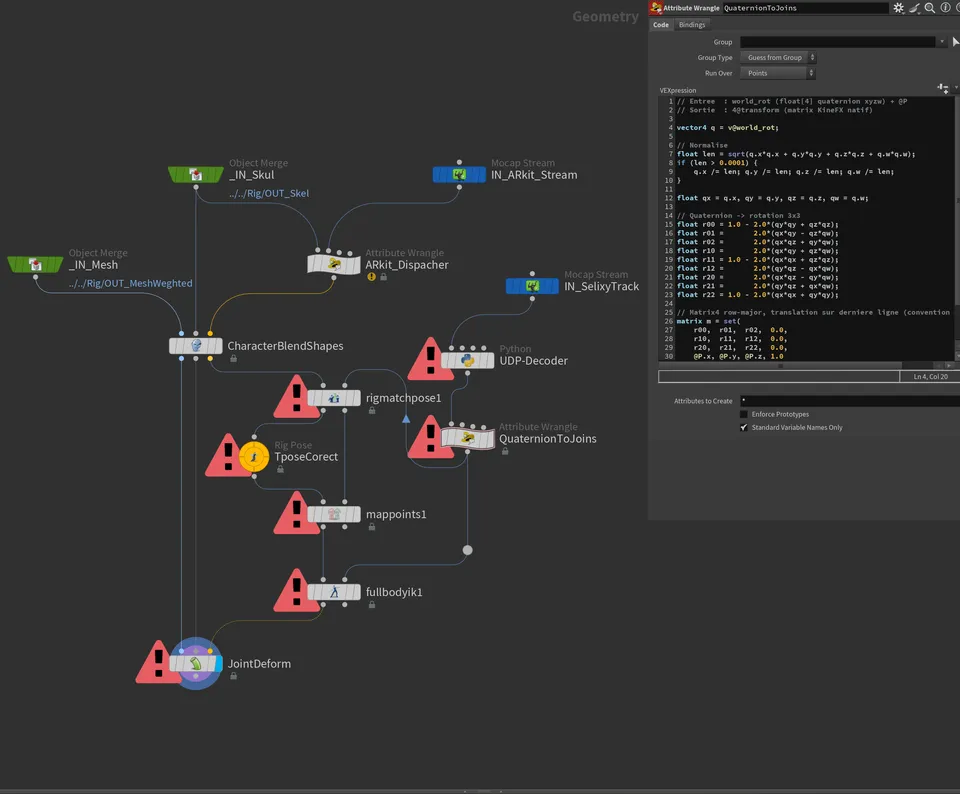
Graphe Houdini : flux ARKit et OptiTrack, retargeting et JointDeform

Les deux flux arrivent dans Houdini, qui les mappe sur le rig du personnage et pousse le résultat vers Unreal via Live Link.

Pourquoi Houdini plutôt que MotionBuilder

MotionBuilder est l’outil que la plupart utilisent pour le retargeting mocap, et c’est ce que j’utilise habituellement. Je passe pourtant par Houdini : avec le flow nodal, on a le feedback du retargeting en temps réel et on voit tout de suite les ajustements à faire.

Dans MotionBuilder, valider un setup de retargeting demande souvent des allers-retours. Dans Houdini, je modifie un noeud du graphe et je vois le résultat en direct sur le squelette piloté. Sur un pipeline à reproduire pour plusieurs personnages, cela permet aussi de prendre les décisions de rig plus tôt.

Mocap pipeline / Tech-art

Virtual Production

A character + mocap pipeline with real-time Houdini retargeting

HoudiniUnreal EngineLive LinkMocapARKitOptiTrackBlenderPipeline

The idea

Virtual Production covers modeling, blendshapes, rigging, cloth physics, retargeting and visualization of a character animated by mocap, facial and body. The data moves from one tool to the next through FBX, then Live Link.

I built it in 2026 as a foundation for my own research. It’s a working base, not a finished tool. Two things are still to do:

  • a client scene in Unreal ready to receive the data, and a Houdini script that sends the scene there automatically, so I stop redoing the same setup on every project
  • once previs is locked (cameras animated, mocap recorded), an automatic export to a more traditional DCC for final rendering and lighting. If the project is real-time, we stop at Unreal

The flow

Upstream prep (modeling, facial scan cleanup, creation of the 52 ARKit-standard blendshapes) can happen in any DCC, as long as the FBX export carries the geometry, the blendshapes and the skeleton. I do it in Blender.

From the FBX, each tool has its own role:

  • Houdini: rigging, cloth physics, retargeting of mocap data onto the skeleton. The nodal approach removes the need for explicit rig controllers
  • Unreal Engine: final visualization through Live Link, which receives the driven skeleton in real time from Houdini

You can also look at the result directly in the Houdini viewport, handy when iterating during setup.

ARKit facial mocap, OptiTrack body mocap

Capture runs on two channels:

  • ARKit for the face: an iPhone reads expressions and streams the 52 blendshape values in real time. It’s the format Live Link Face (Apple/Epic) uses, and the one prepared upstream
  • OptiTrack for the body: a marker-based camera system that outputs the joint positions of the skeleton
Houdini graph: ARKit and OptiTrack streams, retargeting and JointDeform

Both streams land in Houdini, which maps them onto the character’s rig and pushes the result to Unreal through Live Link.

Why Houdini instead of MotionBuilder

MotionBuilder is the tool most people reach for when doing mocap retargeting, and it’s what I usually use. I still go with Houdini: with the nodal flow, you get real-time feedback on the retargeting and see right away what needs adjusting.

In MotionBuilder, checking a retargeting setup usually takes several rounds of back-and-forth. In Houdini, I tweak a node in the graph and see the result live on the driven skeleton. On a pipeline that has to be reproduced for several characters, it also means rig decisions get made earlier.